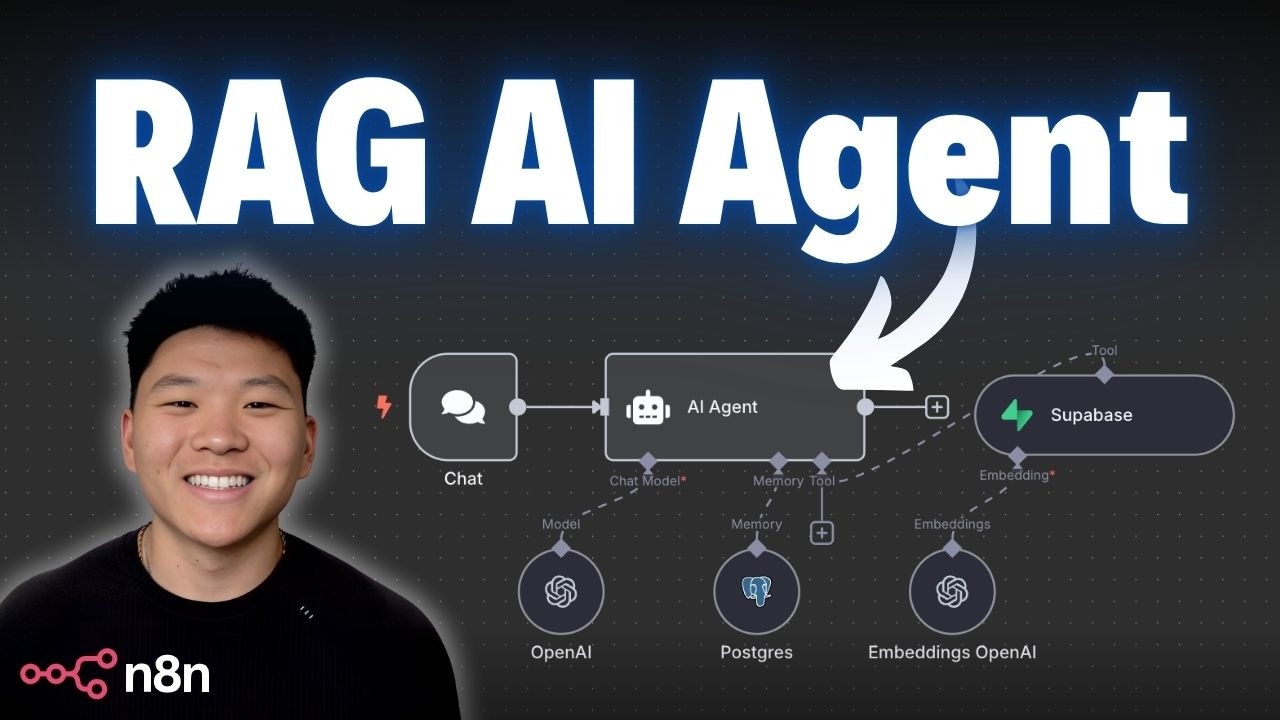
RAG sounds complicated until you separate it into two jobs: put knowledge in, and retrieve the right knowledge back out when a question arrives. That is all you are building here.
In this tutorial, you will create a working no-code RAG agent with n8n as the workflow builder, Supabase as the vector database and memory store, and OpenAI for embeddings and model reasoning. The goal is not to copy a demo blindly. The goal is to understand the pipeline well enough that you can swap the source documents, change the prompt, and reuse the same architecture for your own business knowledge base, SOP library, support documentation, or internal policies.
What You Are Actually Building
A beginner mistake is to treat “RAG” as meaning “vector database.” That is incomplete. RAG means retrieval-augmented generation: the model answers with help from retrieved information instead of relying only on its built-in training.
A practical mental model is this:
- A user asks a question.
- The system turns that question into a numeric representation called an embedding.
- It compares that representation against stored document chunks in a vector database.
- It retrieves the most relevant chunks.
- The model uses those chunks as context to generate a grounded answer.
That means your system has two distinct layers:
- RAG pipeline: gets data into the vector store.
- RAG agent: receives a user question and uses retrieval to answer.
If those two parts are clear in your head, the rest of the build becomes much easier.
Core Concepts Before You Touch the Workflow
Vector databases are about semantic proximity
A vector database stores text as embeddings, which are arrays of numbers representing semantic meaning. Similar meanings land near each other in vector space.
If one chunk discusses “company mission,” another discusses “brand values,” and a user asks “what does this company stand for?”, those items can be near each other even if the wording is not identical.
That is why vector search is useful: it is not just matching keywords. It is trying to match meaning.
Chunking is not optional
You do not usually embed an entire PDF or whole document as one item. You split it into smaller chunks first.
Why:
- Smaller chunks improve retrieval precision.
- Large chunks often mix unrelated topics.
- Retrieved context becomes cheaper and cleaner for the model.
A common beginner error is chunking too aggressively or too loosely.
- If chunks are too large, one chunk may contain five unrelated ideas.
- If chunks are too small, you lose context and answers become fragmented.
For a first build, use the loader or default splitter behavior provided in n8n, then test on real queries before tuning.
Use the same embeddings model for ingestion and retrieval
This is a critical consistency rule. The document chunks must be embedded with the same embeddings model used to embed incoming user queries. If you change the embeddings model on one side and not the other, retrieval quality can drop sharply because the vectors no longer live in the same semantic space.
Memory and RAG solve different problems
Another common confusion: memory is not the same thing as retrieval.
- RAG helps the agent look up facts from documents.
- Memory helps the agent remember the conversation itself.
If the user says, “My name is Nate,” memory should preserve that. If the user asks, “What is the company refund policy?”, retrieval should pull that from stored knowledge.
A usable agent often needs both.
System Architecture
The workflow in this tutorial has two separate builds.
Build 1: Knowledge ingestion pipeline
This pipeline takes a document source and prepares it for retrieval.
Typical path:
- Source document from Google Drive
- Data loader / document reader
- Text chunking
- Embeddings generation
- Supabase vector store write
Build 2: RAG chat agent
This workflow answers questions against the stored knowledge.
Typical path:
- Chat trigger in n8n
- Agent receives user message
- Query embedding generated
- Similar vectors fetched from Supabase
- LLM composes answer from retrieved context
- Optional memory lookup/write through PostgreSQL chat memory
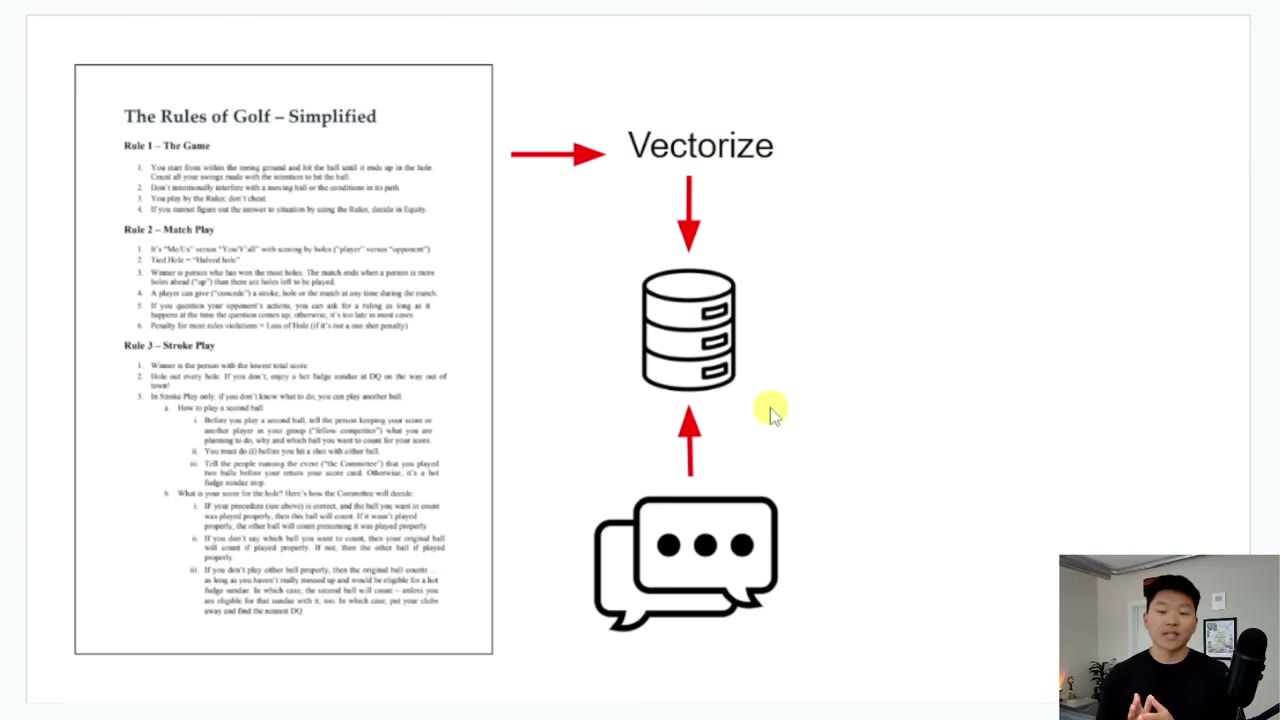
The screenshot marker fits well around the point where the example workflow and source-trigger logic are being introduced. At this stage, you should already be able to explain each node in plain language before you configure anything.
Environment Setup
You need three services configured correctly before the workflow becomes reliable.
1. n8n
Use n8n as the no-code orchestration layer. This is where you visually connect the loader, embeddings model, vector store, agent, and memory.
Before building:
- Confirm your n8n instance can add AI-related nodes.
- Confirm credentials can be created and saved successfully.
- If you are on a hosted or limited environment, verify outbound access to Supabase and OpenAI is allowed.
2. Supabase project
Create a new Supabase project. During project creation, set and save the database password carefully. You will need it later for PostgreSQL chat memory, not just for the vector store.
Practical decision:
- Use a dedicated project for experimentation if this is your first attempt.
- Name it clearly, such as
rag-testorknowledge-agent-dev, so you do not mix it with production data.
Pitfall:
- Many beginners save the project URL and API key but forget the database password. That later blocks PostgreSQL memory setup.
3. OpenAI API credentials
You need valid API access for the embeddings model and for the model used by the agent.
Practical decision:
- Keep embeddings and chat model credentials under one OpenAI account for simpler cost tracking.
- Label the credential in n8n clearly, for example
OpenAI-RAG-Dev.
Pitfall:
- If you create multiple credentials and accidentally pick the wrong one in one node, troubleshooting becomes confusing. Use explicit names.
Step 1: Build the Document Ingestion Pipeline
Your first objective is simple: get document knowledge into the vector database.
Choose a source document that is easy to verify
For a first run, do not use a noisy folder full of mixed files. Use one source document where you already know the correct answers to several sample questions.
Good first examples:
- A company FAQ document
- A short policy handbook
- A product explainer PDF
- A structured SOP file
Bad first examples:
- A folder with dozens of random files
- Scanned PDFs with poor OCR
- Slides with little textual content
- Documents that mix many unrelated domains
Why this matters: early testing should reveal whether the pipeline works, not whether the source data is messy.
Configure the loader
In the example flow, the document is pulled from Google Drive. The exact node may vary depending on your n8n setup, but the role is the same: fetch the document content and pass usable text downstream.
Check these points:
- The file is accessible to the credential you connected.
- The node returns actual text, not just metadata.
- If using PDF or file loaders, confirm extracted content is readable.
Pitfall:
- If the loader produces binary output and the next node expects text documents, the pipeline may appear connected visually while still failing semantically.
Configure chunking
Chunking usually happens in the document loader or a downstream splitting step, depending on the node set you use.
Good default behavior for beginners:
- Keep chunks moderate in size.
- Preserve sentence continuity where possible.
- Avoid chunks so large that an entire section becomes one vector.
What to test after chunking:
- Does a chunk represent one coherent topic?
- Would a user question likely match that chunk’s meaning?
- If retrieved alone, would that chunk still make sense?
A useful rule of thumb: a chunk should be specific enough to be relevant, but complete enough to be understandable.
Configure embeddings
The embeddings node turns each chunk into vectors.
Important decisions:
- Pick one embeddings model and keep it stable.
- Reuse the exact same embeddings configuration later for query embedding.
- Do not mix embeddings providers in a first implementation unless you intentionally support that architecture.
Pitfall:
- Re-ingesting documents with a different embeddings model into the same store can create inconsistent retrieval behavior if you do not manage versions carefully.
Write to Supabase vector store
The vector store node takes embedded chunks and inserts them into Supabase.
Check for:
- Correct project connection
- Correct table or collection target
- Successful write events
- Metadata availability if the node supports it
Practical recommendation:
Store lightweight metadata when available, such as source filename or document title. It makes debugging retrieval quality much easier later.
Step 2: Configure Supabase Credentials Correctly
Beginners often get stuck here, not because the architecture is hard, but because credentials are entered in the wrong place or with the wrong parameter.
For the vector store connection, use the Supabase credential flow expected by the node you selected.
For PostgreSQL memory later, use database connection parameters from Supabase’s Connect section.
What you typically need from Supabase for PostgreSQL chat memory:
- Host
- Database name
- User
- Password
- Port
In the demonstrated flow, the database remains postgres, and the connection parameters come from the transaction pooler section.
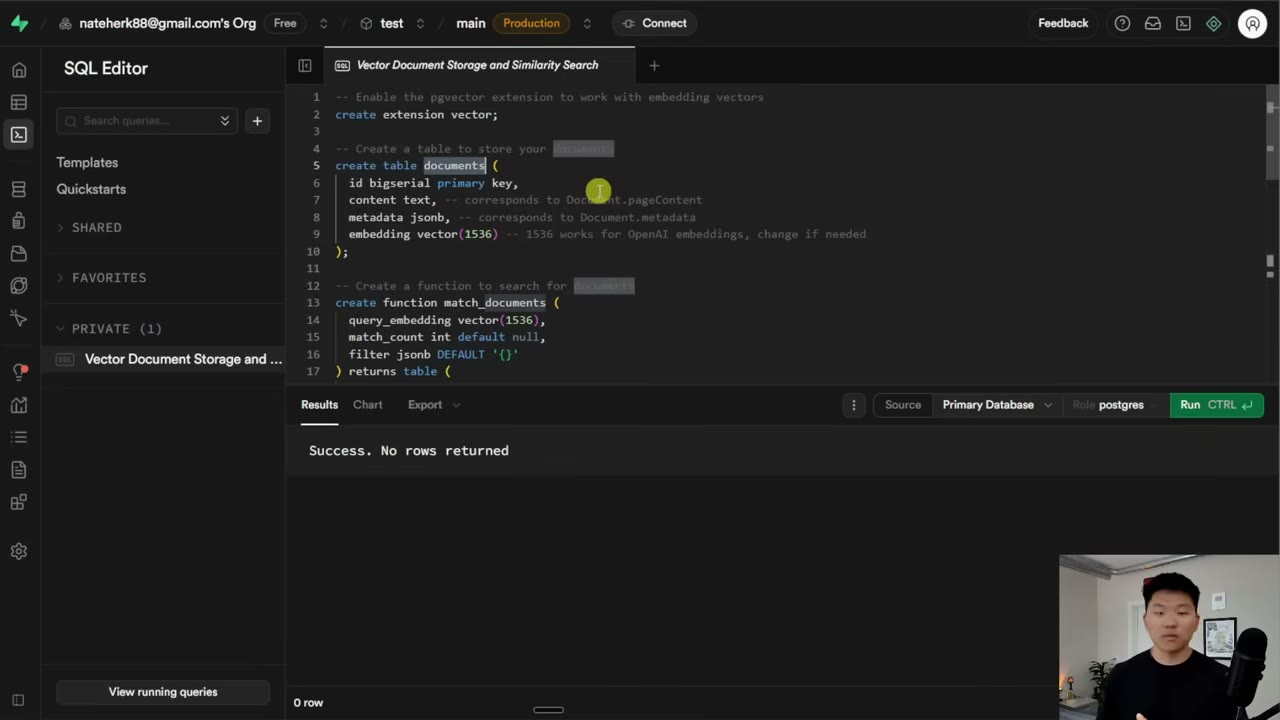
This is the point where many builders misread the Supabase connect panel. The screenshot marker belongs near the credential walkthrough because the operational risk is high: one wrong host or port is enough to make memory appear broken.
Common pitfalls:
- Using the wrong host from the wrong connection block
- Forgetting that the password is the project database password created earlier
- Leaving the default port when Supabase expects the transaction pooler port
- Saving one credential successfully and assuming the PostgreSQL credential uses the same fields
If your test connection does not go green, stop and fix credentials before building more nodes. Do not stack more configuration on top of a broken foundation.
Step 3: Build the RAG Agent Workflow
Once knowledge is in the vector store, build the workflow that answers questions.
Add a chat trigger
The chat trigger starts the interaction. It accepts the user’s query and passes it into the agent flow.
Design decision:
- Keep the trigger workflow simple for the first build.
- Avoid adding too many tools before retrieval works consistently.
At this stage, the minimum success criterion is: ask a question, retrieve relevant chunks, generate an answer grounded in them.
Connect the agent to the embeddings model
The agent must embed the user’s question before semantic search can happen.
Critical rule again: use the same embeddings model used during ingestion.
If the document chunks were embedded with one model and the query with another, retrieval quality can become unpredictable even though everything looks connected.
Connect Supabase vector retrieval
After the query is embedded, the vector store performs similarity search and returns the nearest chunks.
What to inspect:
- How many chunks are returned
- Whether the retrieved chunks are actually relevant
- Whether retrieval is too broad or too narrow
If answers feel vague, the problem is often retrieval quality rather than the model itself.
Let the language model answer from context
Now the model uses:
- the original user query
- the retrieved chunks
- the agent prompt or system instruction
A strong beginner configuration is to instruct the model to answer only from retrieved context when possible, and to say when the source material does not contain the answer.
That reduces hallucination risk.
Example instruction idea:
Answer using the retrieved context first. If the answer is not supported by the retrieved material, say that the source does not provide enough information.
This is an illustrative prompt example. Adjust wording to match your tone and application.
Step 4: Test Like an Operator, Not Like a Spectator
A weak test is asking one obvious question and stopping.
A proper first-pass test includes at least four question types:
-
Direct fact lookup Example: “What is company X’s mission statement?”
-
Paraphrased retrieval Example: “What does company X stand for?”
-
Boundary question Example: “What is the refund window for enterprise contracts?” when that detail may not exist.
-
Multi-turn follow-up Example: “So does that mean I can do this between holes?” after a previous question, to test memory behavior.
What you want to see:
- Correct retrieval on direct wording
- Acceptable retrieval on paraphrases
- Honest uncertainty when the answer is absent
- Better continuity after memory is added
Reading Logs to Diagnose What Really Happened
One of the best habits in n8n is checking logs instead of guessing.
When you inspect the agent logs, you can usually trace the exact path:
- user question received
- query sent to embeddings model
- query vector used for similarity search
- retrieved chunks returned from Supabase
- final generated answer
This is operationally important because it separates three different failure modes:
Failure mode 1: retrieval failure
The wrong chunks were returned.
Likely causes:
- poor chunking
- wrong embeddings consistency
- bad source data extraction
- too much noise in the document set
Failure mode 2: generation failure
The right chunks were returned, but the model answered badly.
Likely causes:
- weak system instruction
- too much irrelevant retrieved context
- model choice not strong enough for synthesis
Failure mode 3: memory misunderstanding
The agent answered the current question correctly, but it did not remember prior user context.
Likely cause:
- memory is not configured, not connected, or not being consulted correctly.
Step 5: Add Memory with PostgreSQL Chat Memory
This is where the agent becomes more conversational.
Without memory, every question is treated like a fresh isolated event. That is acceptable for some search interfaces, but it is clumsy for assistant-like experiences.
Why PostgreSQL memory helps
In this build, Supabase is already part of the architecture, so using PostgreSQL chat memory is a practical choice.
It allows the system to store:
- user messages
- agent replies
- conversation continuity across turns
That means if the user says, “Hello, my name is Nate,” then later asks, “What’s my name?”, the agent can answer from memory instead of re-querying the vector store.
PostgreSQL memory configuration
Create a PostgreSQL credential in n8n using the connection parameters from Supabase.
Typical fields:
Host: copy from Supabase connection parametersDatabase: oftenpostgresUser: copy from Supabase connection parametersPassword: the database password you created when setting up the projectPort: use the correct pooler port provided by Supabase
Example only:
Host: <from Supabase transaction pooler>
Database: postgres
User: <from Supabase>
Password: <your project DB password>
Port: 6543
This is an example structure based on the demonstrated setup. Always use the exact values shown in your own Supabase project.
What memory changes in practice
After memory is enabled:
- follow-up questions become more natural
- the agent can recall short-term facts provided in the conversation
- repeated retrieval for obvious follow-ups may be reduced
But remember: memory should not replace retrieval for document-grounded facts. It complements retrieval.
Practical Configuration Decisions That Matter More Than People Expect
Decide whether your source of truth is documents, conversation, or both
If you do not define this early, your agent behavior becomes inconsistent.
A good rule:
- Use RAG for durable knowledge.
- Use memory for temporary conversational context.
- If the two conflict, define which wins.
For many business assistants, retrieved document knowledge should override uncertain conversational assumptions.
Keep the first dataset narrow
Do not start with every company file you can find. Start with one clear domain.
Examples:
- HR handbook only
- Sales FAQ only
- One product manual only
Narrow scope makes it obvious whether failures come from system design or source sprawl.
Treat logs as part of the product
If you cannot inspect why the agent answered something, you are not operating a system; you are hoping.
Make sure whoever maintains the workflow can answer:
- Which chunks were retrieved?
- Which query was embedded?
- Which memory store was checked?
- Which credential was used?
Common Beginner Pitfalls and How to Avoid Them
Pitfall: “RAG is broken” when the real issue is poor source text
If your PDF is badly extracted or your source document is messy, vector quality suffers immediately.
Fix:
- inspect raw extracted text
- prefer clean text sources for first builds
- verify chunk readability before embedding
Pitfall: using different embeddings models across steps
Fix:
- standardize on one embeddings model for both ingestion and query retrieval
- re-ingest documents if you intentionally change embedding strategy
Pitfall: confusing vector memory with chat memory
Fix:
- remember that vector stores retrieve document knowledge
- chat memory stores conversational turns
- design each for its own job
Pitfall: testing only happy-path questions
Fix:
- include paraphrases, missing-answer questions, and follow-ups
- force the system to reveal its limitations before users do
Pitfall: bad credential hygiene
Fix:
- label credentials clearly in n8n
- keep a record of which project each credential belongs to
- save the Supabase database password securely when the project is created
A Simple End-to-End Example
Imagine you upload a policy PDF about golf tournament practice rules.
The ingestion pipeline does this:
- loads the PDF text
- splits it into chunks
- embeds the chunks
- writes them into Supabase vector storage
Then a user asks:
What am I allowed to do for practice?
The agent workflow does this:
- embeds the query
- searches Supabase for similar chunks
- retrieves the chunk discussing practice rules
- generates an answer grounded in that retrieved policy text
Then the user asks:
So I can’t hit a practice shot between holes?
Now two things can happen:
- Without memory, the agent may search the vector database again.
- With memory, it can use recent conversational context more naturally, while still being able to refer back to retrieved knowledge.
That distinction is exactly why the memory step is worth adding.
Operational Checklist Before You Reuse This for Real Work
Use this checklist before calling the workflow done.
- Confirm the source document is clean and text-extractable.
- Confirm chunked content is coherent when sampled manually.
- Confirm the same embeddings model is used for ingestion and query retrieval.
- Confirm the Supabase vector write step completes successfully.
- Confirm at least three direct fact questions are answered correctly.
- Confirm at least three paraphrased questions still retrieve the right content.
- Confirm one out-of-scope question produces an honest limitation instead of a fabricated answer.
- Confirm agent logs show the actual retrieved chunks.
- Confirm PostgreSQL chat memory connection tests successfully.
- Confirm a multi-turn conversation remembers short-term user context.
- Confirm credentials in n8n are clearly named and not duplicated ambiguously.
- Confirm you know how to re-ingest documents when the source changes.
Where to Go Next
Once this basic architecture works, the next improvements are usually not more complexity, but more discipline.
Improve one layer at a time:
- better source document quality
- better chunking strategy
- tighter answer instructions
- better metadata for debugging
- scoped datasets by use case
- stronger evaluation questions
That is how you move from a demo agent to a tool people can trust.
Source attribution: Based on the tutorial video “From Zero to RAG Agent: Full Beginner's Course (no code)” by Nate Herk | AI Automation, plus the provided source material. URL: https://www.youtube.com/watch?v=cCD303XsUjI