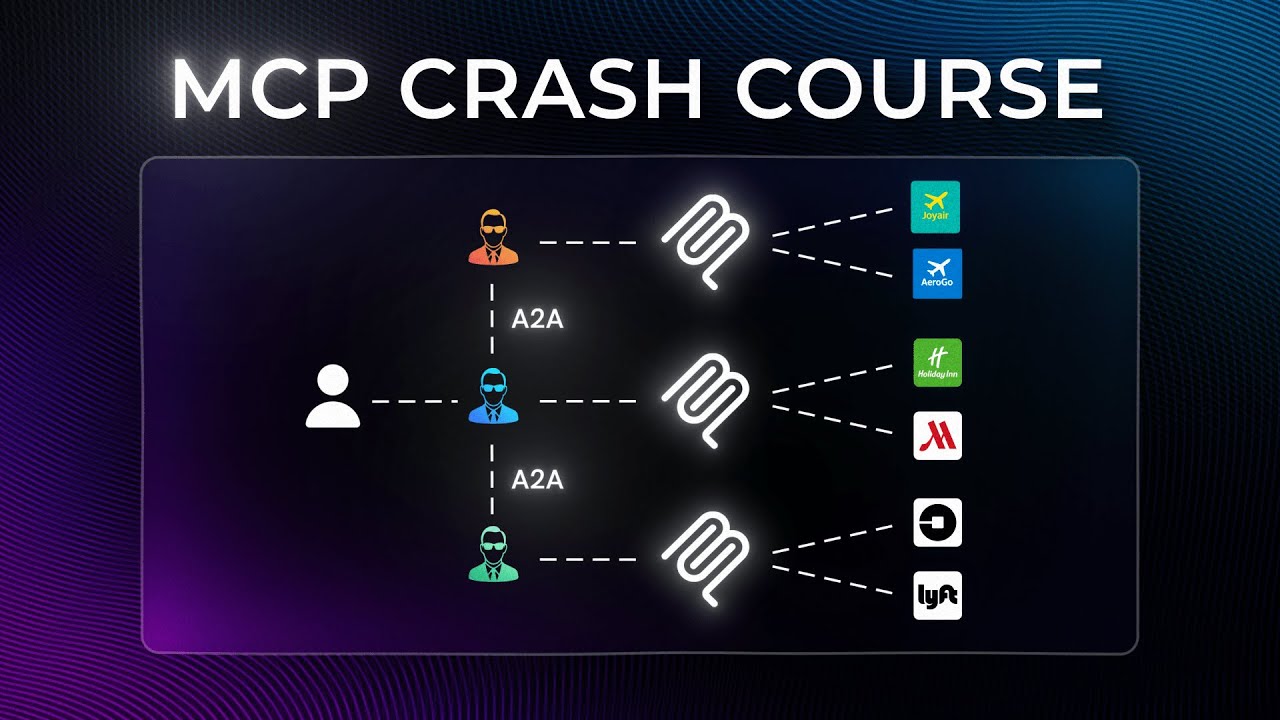
Model Context Protocol, usually shortened to MCP, is becoming the standard way to let AI applications work with external systems in a predictable and reusable way. If you have ever built an assistant that needed to search flights, read internal documents, look up a database, or trigger a workflow, you have already run into the core problem MCP solves: an LLM can generate text, but text alone does not book a ticket, query a tool, or mutate a real system.
This tutorial walks through the complete beginner path in one place. You will learn what MCP is, why it exists, how the server and client responsibilities are separated, how existing MCP servers are typically connected, and how to build a small MCP server and client from scratch in Python. The goal is not to memorize the spec. The goal is to understand the design decisions well enough to implement a working mental model and a working starter project.
Why MCP exists in the first place
A plain LLM interaction is simple: a user sends text, and the model returns text or another supported modality. That works for brainstorming, summarization, translation, and drafting. It breaks down the moment the assistant must interact with live systems.
Consider a flight-booking assistant. A user says: “Find me a good flight next Tuesday, compare price and comfort, and book the best one.” A language model by itself cannot log into airline systems, compare structured responses across providers, or execute a booking. To achieve that, you need an agent layer that can:
- interpret the user’s request,
- choose which external capability to use,
- call that capability,
- inspect the returned data,
- loop when more information is needed,
- and stop only when the task is complete.
Older automation stacks already did something similar with scripts, workflow engines, and decision logic. The difference with modern AI agents is that the control loop can use an LLM for reasoning, tool selection, and response shaping. MCP provides a common protocol so those capabilities do not need to be reinvented tool by tool and app by app.
In practice, MCP reduces the integration problem from “teach every AI app every vendor-specific API” to “expose capabilities through a standard protocol so any compatible client can consume them.” That is the real leverage.
A simple mental model: MCP is a standard contract
The phrase Model Context Protocol becomes easier to understand when split into parts:
- Model: the AI model or model-powered application.
- Context: external information and actions the model needs.
- Protocol: an agreed set of rules for how the pieces communicate.
An MCP server is not “the AI.” It is an adapter layer that exposes capabilities in a standard way. An MCP client is the application that connects to the server, discovers what it offers, and invokes those capabilities as needed.
That means two different teams can work independently:
- one team builds an MCP server for a system such as flights, CRM, docs, or internal inventory,
- another team builds a client in an IDE, desktop app, chatbot, or coding agent.
If both sides follow the protocol correctly, they can interoperate without a custom one-off integration.
The core architecture without unnecessary jargon
At a high level, MCP has three important roles:
- The host application or AI app
- The MCP client inside that app
- One or more MCP servers
The host application is what the user touches: an IDE assistant, an agent runtime, a support chatbot, or a custom Python app. Inside that host, the MCP client handles protocol communication. The MCP server sits next to the external system and exposes capabilities through the standard interface.
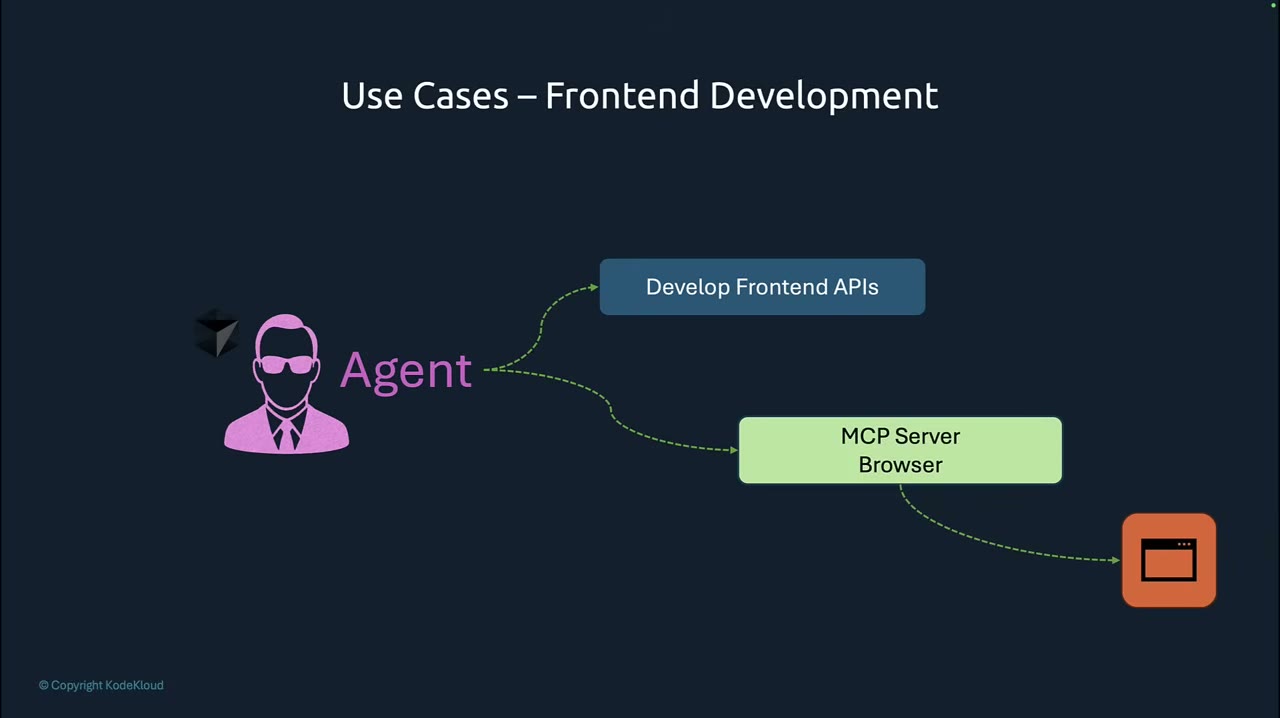
A productive way to think about the separation is this:
- The client is responsible for connecting, discovering capabilities, and making protocol calls.
- The server is responsible for exposing well-defined capabilities and translating those requests into real system behavior.
This separation matters operationally. If you later replace the backend system, you can often keep the client unchanged as long as the server still exposes the same MCP-facing contract.
The three server capabilities beginners should understand first
Many introductions get too abstract too early. For a first project, focus on the three practical capability types highlighted in most MCP examples: resources, tools, and prompts.
Resources: read-oriented context
A resource exposes information the client can fetch. Think of it as structured or semi-structured context the model may need.
Examples:
- airport lists,
- product catalogs,
- company policy documents,
- current inventory snapshots,
- static configuration data.
A resource is a good fit when the operation is primarily about retrieving context, not taking action. In a flight demo, an airport list is a classic resource because the assistant may need a trusted source of valid airport entries before building a search or booking flow.
Tools: action-oriented operations
A tool is what most people care about first because tools let the agent do things.
Examples:
- search flights,
- create a booking,
- query a database,
- open a ticket,
- start a deployment,
- send a message.
A tool usually accepts parameters and returns structured output. The better your input schema and error responses are, the easier it is for the client and the model to use the tool reliably.
Prompts: reusable instruction scaffolding
A prompt capability packages a reusable instruction pattern that the client can ask the server for. This is useful when a workflow benefits from standardized guidance, such as:
- how to gather missing fields before booking,
- how to summarize vendor results consistently,
- how to ask the user for approval before a write action.
Prompts are not a substitute for system design, but they are useful for repeatable interaction patterns.
JSON-RPC 2.0 is not a side detail
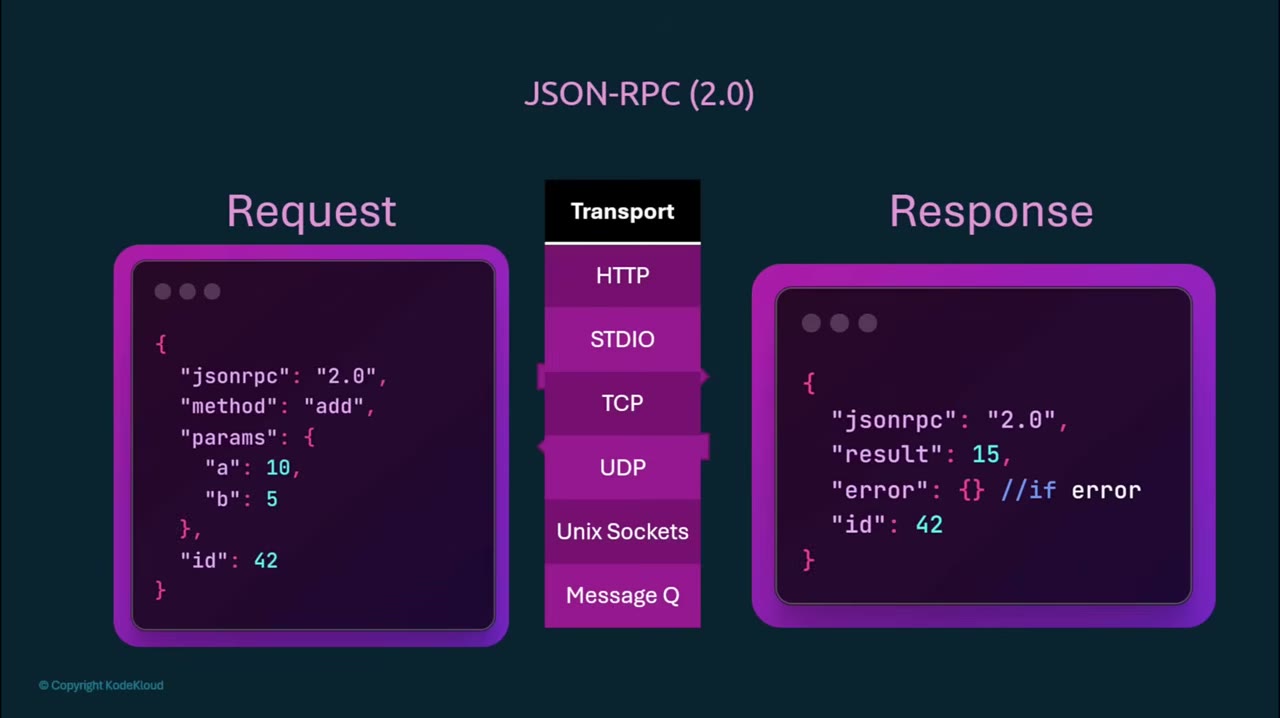
The tutorial material emphasizes that MCP communication follows JSON-RPC 2.0. That matters because it gives you a predictable request/response envelope instead of ad hoc payloads.
In practical terms, your messages follow a standard pattern with:
- a JSON body,
- a method name,
- parameters,
- an identifier for correlating responses,
- and a structured error shape when something fails.
You do not need to handcraft raw protocol frames for your first project if you are using an SDK, but you do need to understand what the protocol is buying you: consistency. When a client talks to multiple servers, that consistency becomes the difference between a reusable integration layer and a pile of bespoke glue code.
One subtle but important point: the connection is typically stateful. Do not assume every call is a completely isolated one-shot HTTP request with no relationship to previous messages. Depending on the SDK and transport, session behavior can matter.
Local vs remote MCP servers
MCP servers can run in two broad ways.
Local server
A local MCP server runs on your machine or inside the same development environment as the client. For example, an IDE can launch the server process directly and communicate over standard input/output.
This setup is ideal for:
- local development,
- prototyping,
- testing internal tools,
- reducing network complexity.
It is often the fastest way to get started because you avoid authentication layers, ingress configuration, and remote deployment concerns.
Remote server
A remote MCP server is hosted elsewhere, such as by your organization or a vendor. Clients connect over HTTP.
This setup is better when:
- multiple users or apps need shared access,
- the server must sit close to protected systems,
- credentials should remain centralized,
- you want managed deployment and monitoring.
The tradeoff is that remote MCP raises real concerns: authentication, authorization, data privacy, trust boundaries, rate limits, audit logging, and uptime. These are not afterthoughts. The moment the server sits outside the user’s machine, you are handling externalized risk.
Using an existing MCP server before building your own
Before you write server code, it helps to understand how a client usually consumes an existing server.
A common local pattern is an MCP configuration file in an AI-capable IDE or assistant. That configuration usually contains a top-level object for MCP servers and an entry per server. A local server entry typically includes:
- the command used to launch the server,
- any startup arguments,
- optional environment variables.
For a remote server, the configuration typically points to a URL instead.
This gives you a practical rule of thumb:
- if the client must spawn the process, think in terms of a command + args configuration,
- if the server already exists elsewhere, think in terms of a URL + auth configuration.
A common beginner mistake is assuming that connecting the server automatically makes the model “smart enough” to use it well. In reality, good results depend on three layers working together:
- the server exposes clean capabilities,
- the client correctly discovers and invokes them,
- the model receives enough instruction and structure to choose them appropriately.
If any of these layers is weak, the whole experience feels unreliable.
Preparing a minimal Python project
For a first implementation, keep the scope intentionally small. A good starter project is a flight-booking demo server with:
- one resource:
airports, - one read-oriented tool:
search_flights, - one write-oriented tool:
create_booking, - one or two prompts for the user interaction flow.
The tutorial material uses a Python environment initialized with uv. A representative setup flow looks like this:
# Example command
uv init flight-booking-server
cd flight-booking-server
uv add mcp
Treat the command names above as illustrative unless you are working in the same lab environment and SDK version. Package names and CLI ergonomics can change. The important decision is not the exact command syntax. The important decision is to start with a fresh project and add the MCP SDK explicitly instead of mixing it into a larger codebase before you understand the moving parts.
A clean project layout for learning can be as small as:
flight-booking-server/
├── pyproject.toml
├── README.md
├── server.py
└── client.py
If you want to keep examples and test data separate, add a data/ directory and place static airport definitions there.
Designing the server before writing decorators
New builders often jump straight into decorators. Start one step earlier: define what each capability should do and what kind of output shape it should return.
For the flight example:
airportsshould return stable airport reference data.search_flights(origin, destination, date, preference)should return a normalized list of candidate flights.create_booking(flight_id, passenger_name, email)should return a booking confirmation object or a structured failure.booking_instructionsprompt should describe how the client should collect missing fields safely.
This design-first step prevents a common trap: exposing raw backend functions as MCP capabilities without cleaning up names, inputs, and response structure.
A protocol is easiest to consume when your capabilities are explicit and boring.
Building the first MCP server
In the tutorial flow, the server is created with a FastMCP-style abstraction from the Python SDK. The exact import may vary by SDK release, but the pattern is straightforward: initialize an MCP server object, then attach resources, tools, and prompts.
A simplified example shape looks like this:
from mcp.server.fastmcp import FastMCP

mcp = FastMCP("flight-booking")
From there, you annotate functions according to what they expose.
Step 1: add a resource
A resource is appropriate for airport data because it is reference context rather than an action.
Representative shape:
@mcp.resource("file://airports")
def get_airports() -> str:
    return "LHR, London Heathrow\nDXB, Dubai\nSIN, Singapore"
Do not focus too narrowly on the exact URI syntax in this example. Focus on the design choice:
- make the resource easy to identify,
- keep the returned content stable,
- use it for data the model may need to read repeatedly.
A practical pitfall here is returning overly verbose or inconsistent data. If your airport resource mixes codes, prose, comments, and malformed lines, downstream tool usage becomes weaker because the model has to infer structure that should have been explicit.
Step 2: add tools
Now expose the actionable parts of the workflow.
Representative shape:
@mcp.tool()
def search_flights(origin: str, destination: str, date: str, preference: str = "balanced"):
    return {
        "results": [
            {
                "flight_id": "FL-101",
                "airline": "Demo Air",
                "price": 480,
                "duration": "7h 40m",
                "cabin": "economy"
            }
        ]
    }

@mcp.tool()
def create_booking(flight_id: str, passenger_name: str, email: str):
    return {
        "booking_id": "BK-9001",
        "flight_id": flight_id,
        "status": "confirmed",
        "passenger_name": passenger_name,
        "email": email,
    }
Two design rules matter immediately:
- Keep tool inputs explicit and typed.
- Return structured data, not a paragraph pretending to be data.
A beginner may be tempted to return: “Booking successful! Your amazing flight is all set.” That is poor tool design. The model can always transform structured output into friendly language later. It cannot reliably reconstruct missing structure if the tool response is vague.
Step 3: add prompts
Prompts can standardize the interaction flow.
Representative idea:
@mcp.prompt()
def booking_prompt() -> str:
    return (
        "When the user asks to book a flight, confirm origin, destination, date, "
        "budget preference, and passenger details before calling create_booking."
    )
The value of a prompt here is operational consistency. If the user says “book something cheap for me next week,” the client or host agent can rely on a prompt pattern that reminds it to gather missing fields before executing a write action.
Building a minimal MCP client
Once the server exists, the client side becomes easier to reason about. The client must:
- connect to the server,
- discover available capabilities,
- call a resource or tool,
- render the result or feed it back into a larger agent loop.
If you are embedding the client into your own Python app, the SDK generally hides the low-level transport details. Your code focuses on session setup and invocation.
A conceptual client flow looks like this:
# Pseudocode only
client = connect_to_mcp_server(...)
capabilities = client.list_capabilities()
airports = client.read_resource("file://airports")
flights = client.call_tool("search_flights", {
    "origin": "LHR",
    "destination": "DXB",
    "date": "2026-06-01",
    "preference": "cheap"
})
The most important lesson is not the API signature. It is that a well-behaved client should discover capabilities instead of hardcoding blind assumptions wherever possible. That improves portability across servers and makes debugging much easier.
Configuration choices that affect real usability
Many first MCP demos work only because the environment is forgiving. In a real setup, a few choices determine whether the system remains usable beyond a tutorial.
Transport choice
If the server is local and development-only, standard I/O is a good default. It is simple and lightweight.
If you need shared access or cross-machine connectivity, use HTTP and treat deployment like a real service.
Resource boundaries
Do not expose everything as a tool. If something is reference data, keep it as a resource. This makes discovery and usage clearer.
Write safety
Any tool that changes state, such as create_booking, should have:
- clear required fields,
- a confirmation step in the host workflow,
- predictable failure messages,
- auditability if used in production.
Naming consistency
Tool names like search_flights and create_booking are better than ambiguous labels like process or run_task. The model, the client developer, and future maintainers all benefit from descriptive names.
Common implementation pitfalls
Pitfall 1: treating MCP like a thin wrapper around random functions
If you simply decorate arbitrary functions from an existing codebase, the server may technically work but be unpleasant to consume. MCP capabilities should be curated. Rename them, clean inputs, normalize outputs, and document intent.
Pitfall 2: returning natural language instead of structured results
Resource output can be looser, but tool output should usually be structured. Machines consume structure better than prose.
Pitfall 3: ignoring auth and trust for remote servers
A remote server is not just a URL. It is a trust boundary. Ask:
- Who is allowed to call it?
- What secrets does it need?
- Does it see user prompts or private data?
- What gets logged?
- Can write actions be replayed?
Pitfall 4: using prompts as a substitute for capability design
Prompts help, but they do not rescue a poorly designed tool surface. If the tool parameters are unclear, prompt engineering is not the real fix.
Pitfall 5: skipping discovery during debugging
When a client-server interaction fails, first check capability discovery. If the client cannot list the expected resource, tool, or prompt, the bug is usually in configuration, registration, or startup rather than in model reasoning.
A practical end-to-end example flow
Let us connect the pieces into one coherent scenario.
A user says: “Find me a cheap flight from London to Dubai next Tuesday and book it under Priya Nair.”
A well-structured MCP-enabled system can follow this sequence:
- The client receives the user request.
- It uses a prompt or internal workflow to verify required booking details.
- It reads the airport resource if needed to normalize locations.
- It calls
search_flightswith structured parameters. - It compares returned options according to the user’s preference.
- It confirms or infers the selected flight.
- It calls
create_bookingonly after the required details are complete. - It returns the booking ID and summary to the user.
This is the key conceptual shift: the model is no longer pretending to have external capabilities. It is orchestrating standardized capabilities provided through MCP.
How to validate your first implementation
A first project is complete only when you can verify behavior systematically.
Test at least these cases:
- the server starts without errors,
- the client can discover the resource,
- the client can discover both tools,
- the airport resource returns usable data,
search_flightsreturns structured candidates,create_bookingrejects missing required fields cleanly,- a simulated success path returns a stable booking object,
- invalid inputs produce explicit errors rather than silent failure.
If your tutorial environment provides lab scaffolding, use it. But even outside a lab, create small manual checks and expected outputs. Tooling confidence matters more than demo theatrics.
Operational checklist
Use this checklist before you call your first MCP project “working”:
- Define which capabilities are resources, which are tools, and which are prompts.
- Keep tool inputs typed and minimal.
- Return structured JSON-like objects from tools.
- Choose local standard I/O for fast prototyping; choose HTTP when you need shared access.
- Verify capability discovery before debugging model behavior.
- Add confirmation around any write action.
- Decide what data the remote server is allowed to see and log.
- Use clear names that describe business intent.
- Test both happy paths and malformed inputs.
- Document the connection method for the client: command + args for local, URL + auth for remote.
Final perspective
MCP is important not because it adds another acronym to AI engineering, but because it creates a reusable boundary between model-powered applications and real-world systems. Once you understand that boundary, the rest becomes much easier to reason about.
Your first useful project does not need a giant agent framework. Start with one resource, two tools, and one prompt. Make the outputs structured. Keep the transport simple. Verify discovery first. Then expand gradually.
That path teaches the right lessons: protocol discipline, capability design, and operational clarity.
Source attribution: Based on the tutorial video “MCP Tutorial: Build Your First MCP Server and Client from Scratch (Free Labs)” by KodeKloud. URL: https://www.youtube.com/watch?v=RhTiAOGwbYE