
Why durable execution matters for agents
The OpenAI Agents SDK makes it straightforward to define agents, tools, handoffs, guardrails, and tracing. That is enough for a local prototype, but production agents usually run longer than one request. They may crawl the web, call external APIs, wait for a human answer, generate files, or coordinate several specialist agents. If the process crashes during that work, a simple script loses memory of what already happened. The user waits, the system pays again for repeated model calls, and the final result may become inconsistent.
Temporal solves this by moving orchestration into a durable workflow. The workflow records the important steps in an event history. Activities such as model calls, web searches, or PDF generation can be retried independently. Workers can disappear and come back. A workflow can wait for minutes, days, or much longer while preserving state. The key idea is simple: keep agent decisions in a workflow, put unreliable side effects in activities, and let Temporal manage retries, scheduling, and recovery.
Architecture at a glance
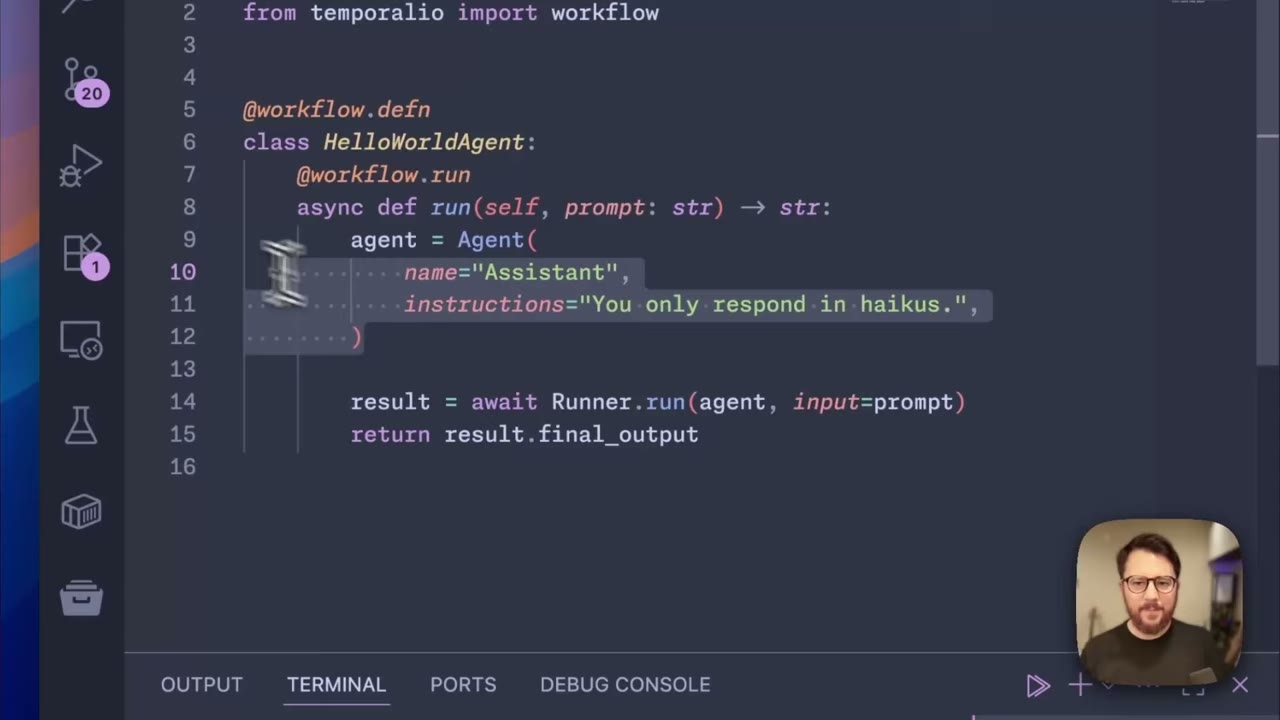
A useful production layout has four pieces. First, define the agent with the Agents SDK: instructions, tools, handoffs, and any guardrails. Second, wrap the entry point in a Temporal workflow. Third, call model and tool operations through Temporal activities so each operation can be retried and inspected. Fourth, run one or more Temporal workers to execute queued workflow and activity tasks.
For a small hello-world agent, this can feel like extra structure. The benefit appears when the task becomes a research job, a support workflow, or a report generator. Each search, summarization step, user clarification, and final document operation can become an activity or workflow update. If a search times out, only that activity retries. If a worker process dies, the workflow stays alive in Temporal and resumes when another worker is available.
Step 1: Start with the agent boundary
Before adding Temporal, decide what the agent is responsible for. A good boundary is a business task, not an implementation detail. For example, build a deep research agent that accepts a topic and returns a structured report. Inside that task, you may have a planner agent, a search agent, a synthesis agent, and a PDF generation tool. The Agents SDK can express these roles with multiple agents and handoffs.
Keep the workflow input small and serializable: topic, user preferences, output format, and request id. Avoid passing live clients, open sockets, or large raw files into the workflow. Temporal workflows replay their history, so workflow code should be deterministic. Put model calls, network calls, filesystem writes, and PDF generation into activities.
Step 2: Convert side effects into activities
Activities are where unreliable work belongs. A model call activity can invoke the Agents SDK runner. A web search activity can call a crawler or search API. A PDF activity can write a final file. Each activity should have a timeout and retry policy. That policy is the difference between a demo and a resilient system.
For model calls, use idempotency where possible. Include the workflow id, activity name, and logical step name in logs and traces. If a tool writes to an external system, make the write idempotent or record a durable external id before retrying. Temporal will retry when the activity fails, so duplicated side effects must be considered deliberately.
Step 3: Use event history as the debugging surface
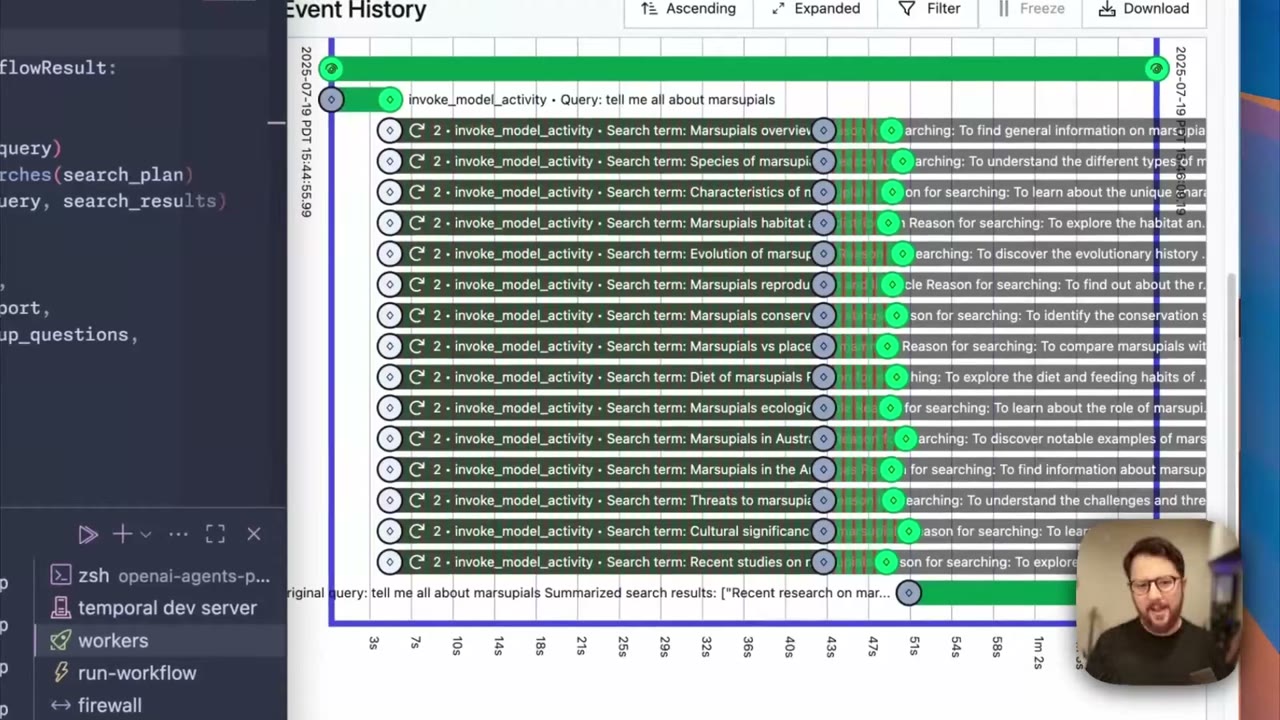
Temporal records workflow events: scheduled activities, started activities, retries, failures, timers, updates, and completion. This history becomes a practical debugging timeline. Instead of asking whether the agent got stuck somewhere inside one long process, you can see the exact activity that failed and the reason it is retrying.
This pairs well with Agents SDK tracing. Temporal tells you which durable step ran; tracing tells you what happened inside the model or tool call. Use both. A production incident often needs both views: the orchestration view for reliability and the model trace for reasoning quality.
Step 4: Scale with workers, not rewrites
A single-process agent is hard to scale because all work lives inside one runtime. With Temporal, workers poll task queues. To add capacity, start more workers. Workflows can distribute activity tasks across available workers, and workers can run in different containers, availability zones, or clusters.
This scaling model is especially useful for research agents. One topic may spawn many searches in parallel. Another may wait for a user clarification. A third may be generating a report. Workers can pick up tasks as capacity appears. The workflow state remains in Temporal, not in a fragile local process.
Step 5: Add human interaction with workflow updates
Many serious agents need clarification before they act. Temporal workflow updates let a running workflow receive structured input after it has started. A triage agent can decide that the topic is ambiguous, a clarification agent can generate questions, and the workflow can wait. When the user answers, the application sends those answers as updates. The workflow then continues with a better prompt.
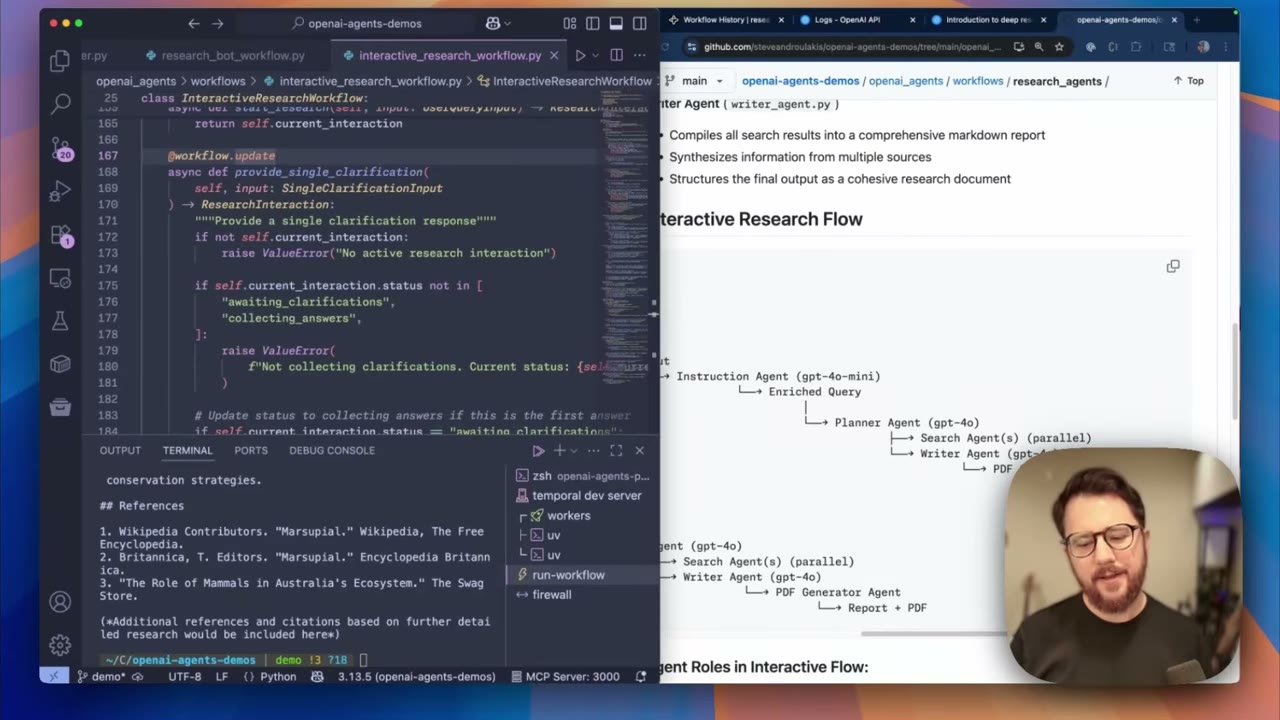
This pattern is stronger than asking all questions upfront. The workflow owns the state, the user can answer later, and the agent does not need to keep a process open while waiting. It also makes review and audit easier because every update becomes part of the workflow history.
Common mistakes
Do not put network calls directly in workflow code. Workflow code must be replayable, so side effects belong in activities. Do not rely only on retries without thinking about idempotency. A retried activity that charges a customer, sends an email, or writes a file can create duplicates if you do not design for it. Do not hide all work inside one giant activity either. Split activities by meaningful step so failures are visible and recoverable.
Another mistake is treating Temporal as only a crash recovery tool. It is also a coordination layer. Use it for long waits, user input, retries, scheduling, parallelism, and audit history.
Production checklist
- Define a small workflow input and a clear workflow result.
- Keep workflow code deterministic.
- Move model calls, API calls, crawlers, and file generation into activities.
- Set timeouts and retry policies per activity.
- Make external side effects idempotent.
- Run multiple workers before you need emergency capacity.
- Combine Temporal event history with Agents SDK traces.
- Use workflow updates for human clarification or approval.
- Test process crashes, network loss, and tool bugs before launch.
Original video source
This tutorial is based on Temporal's demo video: https://www.youtube.com/watch?v=fFBZqzT4DD8
Practical extension
To apply the ideas, choose a small bounded project: read local documentation and generate a migration checklist, or ask a coding assistant to change one component and run tests. Write the input, output, tool permissions, and acceptance criteria before execution. Separate model reasoning, tool calls, orchestration, and verification instead of asking one prompt to handle everything.
Common mistakes include copying tutorial code directly into production, optimizing model output while ignoring source quality, and skipping rollback plans. Any workflow that writes to a database, sends a message, or modifies files needs logs, idempotency, and review points.
A useful exercise is to implement the same task three ways: pure prompting, SDK tool calls, and an orchestrated workflow. Compare speed, reliability, review effort, and recovery behavior. This makes it clear when a lightweight approach is enough and when a durable architecture is justified.